Platform / Triage and incidents
Related alerts become one incident
The AEGIS triage queue orders alerts by severity, then risk. Alerts that share an entity within 10 minutes join one incident.

How the queue is ordered
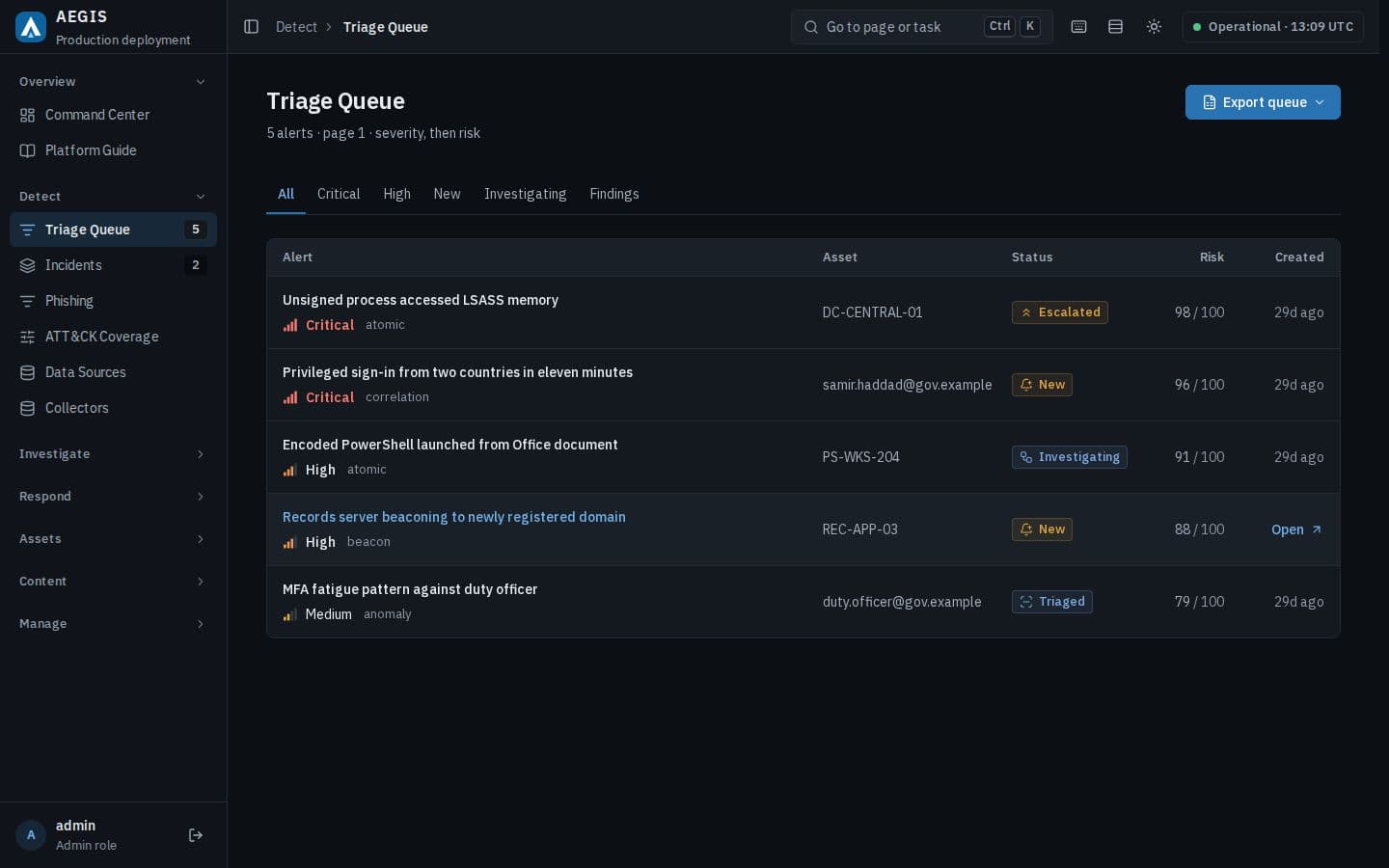
AEGIS orders the Triage Queue by severity, then by risk, 25 alerts to a page. Severity runs from 5, Critical, down to 1, Info. Each row carries the AI analyst's verdict and confidence, or the state of its run (not run, queued, running or run failed), and the number of its actions that await approval.
Risk belongs to entities. Each alert adds risk to every entity it names, and that risk decays with a half-life of 24 hours by default.
Triage Queue
The queue an analyst works from: each alert with its severity, its risk and its status.
Working an alert
Filter the queue five ways
By status, severity, kind, technique and entity.
Move through it from the keyboard
J and K move between alerts, Enter or O opens the focused one, and X selects it.
The alert page opens on the decision
A Decision card shows the response actions raised from the alert that await approval, and the status controls. Below it come the verdict, the confidence and who closed it, the AI's steps, the evidence, entity risk and the alert's path through the pipeline.
Review what the AI closed or held
A Needs confirmation tab lists held AI calls and the AI closures drawn into the review sample. The analyst chooses Confirm benign or Reopen alert, and that first status change is recorded as a review that confirms or overturns the AI.
One investigation per alert
A new run on an alert that already has an investigation is refused. Dig deeper continues the existing one with a follow-up question.
Every investigation in one list
Agent Runs shows each investigation with its verdict, how it was decided (model, heuristic, held or degraded), its response state and its confidence.
How alerts become an incident
Match
A new alert joins an active incident when it shares an entity with it and arrived, or its events happened, within 10 minutes.
Cap
An incident holds up to 15 alerts. The next alert on that entity opens an incident marked Continues incident, linked to the full one.
Score
The incident takes the highest severity among its alerts. Adding, splitting or merging alerts recomputes severity and score the same way grouping does.
Explain
The incident page shows the blast radius, the grouped evidence and why each alert was grouped.
Work
An incident moves from new to investigating, contained and resolved. An analyst takes ownership, adds, splits or merges alerts, and writes notes.
What joins alerts into an incident
| Entity or event | Effect on grouping | Detail |
|---|---|---|
| Host name | Joins alerts into one incident | Compared without regard to case |
| Account name | Joins alerts into one incident | Compared without regard to case; short and down-level forms join through the internal and NetBIOS domains you configure |
| Process, file hash, domain, destination address | Recorded on the alert | Kept with the alert as evidence; grouping does not use them |
| Shared infrastructure | Set aside from grouping | An admin tags a DNS server or a proxy as shared, and the group reason names it |
| A match on a resolved incident | Opens a new incident linked to the old one | Or reopens the old one, if you set the policy to reopen |
Common questions
What states can an alert be in?
New, investigating, pending review, resolved as a true positive, resolved as a false positive, escalated, or suppressed by context.
Can the priority of an incident be explained to someone outside the SOC?
Every incident is also readable through the API as a story, with a priority from 0 to 100 and the contribution of each factor to it.
Can alerts from another detection tool enter the same queue?
Yes. A third-party alert can be posted into your tenant through the API. An action the AI requests for such an alert waits for approval by someone other than the person who posted it.
Can we take the queue out of the console?
Yes. The Triage Queue, Incidents and Agent Runs each export their full filtered collection as a spreadsheet workbook or as JSON.
Read next.
- AI analystThe AEGIS AI analyst investigates alerts with nine read-only tools and quotes its evidence word for word.
- Case managementAEGIS opens a case when an alert is a true positive or is escalated.
- Too many alertsAEGIS queues each alert for an investigation and closes the harmless ones that pass its checks.
Talk to an engineer
Tell us what you run today and what worries you. Someone who works on AEGIS will reply.
Get in touch